 .
To get the formula for the surface, we apply the scale and
the rotation to c(t); at the point p(t), the cross-section should
be
.
To get the formula for the surface, we apply the scale and
the rotation to c(t); at the point p(t), the cross-section should
be


Computer graphics Programming Assignment 4
The goal of this assignment is to build a simple interactive modeller, that would allow you to create shapes called generalized cylinders, which can be thought of as pipes with variable cross-section. Generalized cylinders can be built out of curves. Your program should allow the user to define all necessary curves; it should compute and draw the generalized cylinder, and allow the user to choose the viewing direction.
The assignment has two parts: required and extra credit. You have to do only the required part, but you will receive bonus points if you do all of it.
 to the curve, and the unit
unit normal vector
n(t) to the curve; then define
b(t) as the
vector product
to the curve, and the unit
unit normal vector
n(t) to the curve; then define
b(t) as the
vector product
 .1
The surface of the pipe is defined parametrically as
.1
The surface of the pipe is defined parametrically as
A generalized cylinder is slightly more complicated; instead of using a fixed
cross-section, we allow the cross-section to vary; the initial curve
c(u) is used as a template, which can be deformed as we move along
the curve p(t). We will consider only two simple ways to deform
the cross-section: scale and rotation. To define how the cross-section
is scaled, we define how the scale factors in two directions change
with the parameter t:
s = (su(t), sv(t)).
To define the rotation of the cross-section, we define how the angle
of rotation changes with t:
.
To get the formula for the surface, we apply the scale and
the rotation to c(t); at the point p(t), the cross-section should
be

The equation for the surface of the generalized cylinder is
 .
Each of the
curves can be specified as a B-spline. Note that
p(t) is a
curve in space, so it has 3D control points, c(r) is a curve in
the plane, so it has 2D control points, and, finally, the
control points of 1d curves su(t), sv(t) and
are
simply numbers. However, the algorithm that one can use to
compute the curves is exactly the same in all cases, and coincides
with the one that we have discussed in class for the curves on the
plane.
.
Each of the
curves can be specified as a B-spline. Note that
p(t) is a
curve in space, so it has 3D control points, c(r) is a curve in
the plane, so it has 2D control points, and, finally, the
control points of 1d curves su(t), sv(t) and
are
simply numbers. However, the algorithm that one can use to
compute the curves is exactly the same in all cases, and coincides
with the one that we have discussed in class for the curves on the
plane.
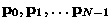
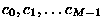
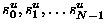
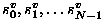
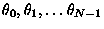
To describe the generalized cylinder as a B-spline, we specify control points (3D, 2D or 1D) for each of the curves. First, we choose the numbers of control points for the curves p(t)and c(r). The numbers of control points for other curves are the same as for p(t). Suppose the first number is N and the second number is M; the control points are
 ;
;
 ;
;
 ;
;
 ;
,
;
,
 .
.
Suppose all the control points are specified; how do we draw the generalized cylinder? The idea is to make lots of small quadrilaterals approximating the cylinder, and draw these quadrilaterals. Thus, we need to compute the vertices of the quadrilaterals. This is done in several steps.
First, we obtain a sufficiently close approximation to the
curves described above; this is done by applying the subdivision
algorithm for cubic splines that we have discussed in class several
times (3 should be sufficient); the output of the algorithm
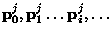
is the new sets of control points which we will denote
 ,
,
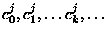 etc. The numbers of control points
after j subdivision steps will be
2j (N-1) + 1 and
2j (M-1) + 1. Next, for each control point
pji we
compute the unit normal
ni and
bi. This is
done using the formulas that are listed below.
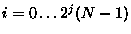
Next, we compute a 2d array of vertices of the quadrilaterals that
we are going to draw. We get formulas for the vertices
if we replace curves with their control points in formula (1).
etc. The numbers of control points
after j subdivision steps will be
2j (N-1) + 1 and
2j (M-1) + 1. Next, for each control point
pji we
compute the unit normal
ni and
bi. This is
done using the formulas that are listed below.
Next, we compute a 2d array of vertices of the quadrilaterals that
we are going to draw. We get formulas for the vertices
if we replace curves with their control points in formula (1).
![\begin{displaymath}v_{ik} =
\mathbf{p}^j_i + (\cos \theta^j_i [s^u]^j_i u^j_k -...
...^j_i u^j_k + \cos \theta^j_i [s^v]^j_i v^j_k )
\mathbf{b}^j_i,\end{displaymath}](img14.gif)
 ,
,
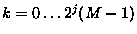 Finally, we simply draw
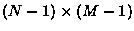 quadrilaterals with
vertices
quadrilaterals with
vertices
 ,
,
.
,
,
.
 and
nji.
and
nji.
Each curve is defined by picking a number of control points. When you click on the cross-section window, you add a new control point to the cross-section curve. When you click on one of the space curve windows, you add a control point to the space curve.
If the key ``C'' is pressed in the results window, all curves should be removed and the number of control points reset to zero.
.
The range of  should be
  to
to  ,
the
range of scales may be chosen to be 0..10. These windows
are different from the other windows: here you cannot add the control
points, as the number of control points on these curves should be
exactly the same as for the curve
p(t). Each time a control
point is added in the space curve window, add control points to the
scale and rotation curves, with some default values (e.g. 1 for
scales and 0 for rotation); do not forget to resubdivide and
redraw the curves. The second difference is that the
control points for the curves su(t), sv(t)and
are 1D, i.e. are just numbers. This means that the
curves can be displayed as plots of functions. To be more specific, to draw
the curve sv(t) given its approximation
,
the
range of scales may be chosen to be 0..10. These windows
are different from the other windows: here you cannot add the control
points, as the number of control points on these curves should be
exactly the same as for the curve
p(t). Each time a control
point is added in the space curve window, add control points to the
scale and rotation curves, with some default values (e.g. 1 for
scales and 0 for rotation); do not forget to resubdivide and
redraw the curves. The second difference is that the
control points for the curves su(t), sv(t)and
are 1D, i.e. are just numbers. This means that the
curves can be displayed as plots of functions. To be more specific, to draw
the curve sv(t) given its approximation
![$[s^v]^j_0,[s^v]^j_1,
[s^v]^j_2,\ldots$](img23.gif) ,
we draw line segments connecting 2D points
with coordinates
,
we draw line segments connecting 2D points
with coordinates
![$(0, [s^v]^j_0), (1/2^j, [s^v]^j_0)\ldots
(i/2^j, [s^v]^j_i)\ldots$](img24.gif) .
Note that the first coordinate depends only
on the number of the point and we cannnot control it. In the
scale and rotation windows, the control points can move only up and
down. In the scale window, the vertical coordinate corresponds to
the scale, in the rotation window, to the angle of rotation. The
horizontal coordinate in both cases corresponds to the parameter
t. To change the values of the control points in these windows
we can do the following: Suppose the mouse was pressed (not clicked!)
at a pixel (x,y). Convert x to the range [0..N-1] where
N is the number of control points, and find the closest one.
We are going to modify the control point with this number.
If we move the mouse without releasing the button, the value is
changed proportionally to the displacement of the mouse from the
initial position. Do not forget to update all the windows each
time the mouse motion callback is called.
.
Note that the first coordinate depends only
on the number of the point and we cannnot control it. In the
scale and rotation windows, the control points can move only up and
down. In the scale window, the vertical coordinate corresponds to
the scale, in the rotation window, to the angle of rotation. The
horizontal coordinate in both cases corresponds to the parameter
t. To change the values of the control points in these windows
we can do the following: Suppose the mouse was pressed (not clicked!)
at a pixel (x,y). Convert x to the range [0..N-1] where
N is the number of control points, and find the closest one.
We are going to modify the control point with this number.
If we move the mouse without releasing the button, the value is
changed proportionally to the displacement of the mouse from the
initial position. Do not forget to update all the windows each
time the mouse motion callback is called.
.1