

Computer graphics Programming Assignment 3
This assignment is your first introduction to 3D graphics. To be able to construct and display 3D scenes it is very important to understand how transformation matrices determine the way the points defined in the world coordinates are projected to the screen.
In this assignment you will write a program that draws a simple 3D scene and allows you to move around in that scene. Positioning the objects and changing position of the camera will require extensive use of modeling, viewing and projection transformations. We recommend that you read Chapter 3 of OpenGL Programming Guide which contains a detailed description of OpenGL transformations and corresponding commands.
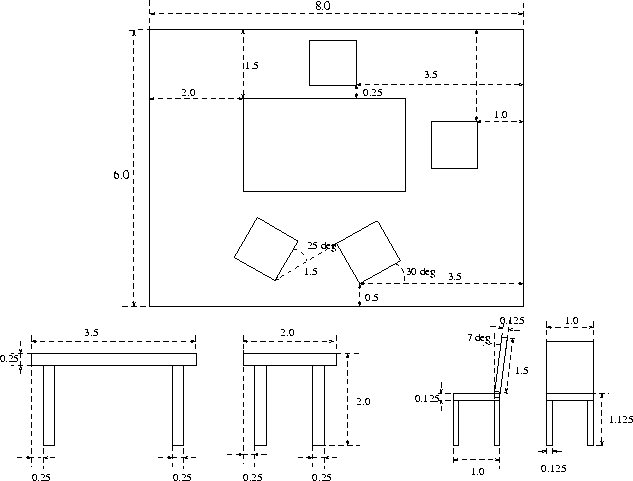
Your program should display a scene, consisting of a table and 4 chairs standing on a rectangle representing the floor. (you can add more objects if you like). The positions and dimensions of the objects are shown in Figure 2.
Initially, set the camera into the position 4 units above the floor, 4 units to the left and 4 units perpendicular to the side of the table which has two chairs next to it. The viewing direction should be towards the middle of the table. Make sure that the scene fills most of the picture by choosing appropriate field of view.
Create a pop-up menu that would allow you to choose the type of camera motion. Implement the following options:
Once the type of camera motion is chosen, when the user clicks the left button, the camera starts moving, the second click stops it, another click starts it again. The type of motion can be changed at any time; the trajectory should stay continuous, the last position of the camera before the change becomes the first position after the change.
Do not use the following commands in this assignment: any aux or glut commands for drawing objects; the gluLookAt command. For matrix operations, use only glLoadMatrix and glMultMatrix. Do not use glTranslate, glScale and glRotate. Implement their functionality using the formulas discussed at the lecture. However, we recommend that you use these commands while debugging the scene and camera motion, and, once everything is working, replace them with your own equivalent functions.
This time, just a working version of the program :-)
To draw all the objects in the picture you will have to tell OpenGL where to draw each polygon (rectangle, to be more specific) representing a part of an object. Trying to calculate positions of all vertices of all objects in the scene by hand is not a very good idea; also, in that case, if you would want to move something, it would be rather difficult.
Typically, one builds scenes like this hierarchically. First, notice that all objects can be built out of boxes. Write a function that draws a box (we ask you not to use the aux library call.) Then write functions that draw the table and the chair, setting up proper transforms and calling the function that draws boxes to draw various parts of the object. Finally, write a function that draws the whole scene.
You will need to keep around a few vectors and possibly matrices. We suggest that you create classes to support operations on homogeneous points, vectors and 4x4 matrices. Sample class definitions are included at the end of this assignment. Do not get carried away improving your library: this is not our goal.
Make as few preliminary calculations on paper as possible; try to structure your program in such a way that all objects and their positions are computed directly from the data in the picture, without any manual calculations. Avoid having too many specific dimensions in your program: try to parametrize each object by several numbers; for example, the all you need to specify for the table, assuming a number of symmetries, is the length of legs, the thickness of the lid, the size of the cross-section of a leg, and the distance from the leg to the edge.
Start with implementing the scene; implement camera transformations last. While debugging the scene, use simple camera positions and orientations (e.g. looking along X, Y and Z axes). It is useful to be able to see the coordinate system; for debugging purposes, draw thin long boxes of different colors along the positive directions of the axes.
To see the scene, we need a light source; if we do not put a light somewhere, the polygons of the scene are still visible, but they are flat-shaded i.e. all pixels in the image of any polygon have the same color. Pictures like this do not look very interesting. We will discuss lighting in greater detail later; for this assignment, use the following OpenGL calls to enable lighting, after you set up your projection matrix, but before you setup the modelview matrix:
  glEnable(GL_LIGHTING);

  GLfloat light_pos[] = { X,Y,Z,1};
  glLightfv(GL_LIGHT0, GL_POSITION, light_pos);
  glEnable(GL_LIGHT0);
The numbers X,Y,Z specify the position of a point light source. If you want to define some fancier lighting or change the color of the objects, read the OpenGL manual.
IMPORTANT: you do not have to implement these classes in this particular form; you do not have to implement all operations for each class, only the ones that you really need. Do not spend too much time working on your library, but test all functions and have enough asserts in the code.
// sample definitions for homogeneous point, vectors and 4x4 matrices;
// this code is based on sample code from Brown University, CS123
// this code is not complete


class HPoint{
public:
	HPoint  (void);
	HPoint  (double x, double y, double z);
	HPoint  (double x, double y, double z,double w);
	HPoint  (const HPoint &p);
	~HPoint (void);
	int        operator == (const HPoint &p) const;
	int        operator != (const HPoint &p) const;
	HPoint &   operator =  (const HPoint &p);
	double     operator [] (const int i) const;

private:
	double v[4];
}


class HVector {
	HVector  (void);
	HVector  (double x, double y, double z);
	HVector  (const HPoint &p);
	~HVector (void);
	int        operator == (const HVector &p) const;
	int        operator != (const HVector &p) const;
	HVector & operator =  (const HVector &p);
	double     operator [] (const int i) const;
}

class HMatrix {
public:
	HMatrix  (void);
	HMatrix  (const HMatrix &);
	~HMatrix (void);
	int        operator == (const HMatrix &) const;
	int        operator != (const HMatrix &) const;
	HMatrix & operator =  (const HMatrix &);

	// returns the element [i][j] as in { foo = m(1, 2); }
	double     operator () (int i, int j) const;
	// sets element [i][j] as in { m(i,j) = 3.14; }
	double &   operator () (int i, int j);
private:
	double v[16];
}


// arithmetic operators

HVector operator * (double s, const HVector &v);
HVector operator * (const HVector &v, double s);
HVector operator / (const HVector &v, double s);
HVector operator + (const HVector &u, const HVector &v);
HPoint  operator + (const HVector &v, const HPoint  &p);
HPoint  operator + (const HPoint  &p, const HVector &v);
HVector operator - (const HVector &v);
HVector operator - (const HVector &u, const HVector &v);
HPoint  operator - (const HPoint  &p, const HVector &v);
HVector operator - (const HPoint  &p, const HPoint  &q);

// --- Vector dot and cross products
double  dot   (const HVector &u, const HVector &v);
HVector cross (const HVector &u, const HVector &v);

double   length     (const HVector &v);
// --- Unit length vector pointing in the same direction
HVector normalize  (const HVector &v);

// --- Matrix Operators
HVector operator * (const HMatrix &, const HVector &);
HPoint  operator * (const HMatrix &, const HPoint  &);
HMatrix operator * (const HMatrix &, const HMatrix &);