


Computer graphics Programming Assignment 5
The goal of this assignment is to build a simple interactive modeler, that would allow you to create ribbon-like shapes.
 .
The ribbon is a surface given by the formula
.
The ribbon is a surface given by the formula
The parameter u varies from 0 to n-1, where n is the number of control points that we specify, and v varies in the range -1 to 1. The original curve is a line along the center of the ribbon. If the twist angle is zero for all u, then the ribbon is parallel to the X-Z plane.
The curve p(t) will be called the spine of the ribbon.
The ribbon can be specified using cubic B-splines.
The user specifies n control points
 ,
and
for each point the twist angle
,
and
for each point the twist angle  ,
,
 (the user interface for this is described below). Thus, a
ribbon is represented by two arrays: an array of control points
for the spine and an array of twist angles of the same size.
(the user interface for this is described below). Thus, a
ribbon is represented by two arrays: an array of control points
for the spine and an array of twist angles of the same size.
To render the ribbon we compute an approximation with quads
in the following way. First, we subdivide the spine curve using the
algorithms described in class. The result, after k subdivision
steps, is an array of
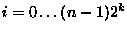
2k(n-1)+ 1 points, which we denote
pki= (xki,yki,zki),
 .
We apply the same subdivision
rules to compute the array of twist angles,
.
We apply the same subdivision
rules to compute the array of twist angles,
 ,
.
Once both arrays are computed, we pick
a number M, which is the number of polygons across the
ribbon. A reasonable value would be 10, unless the twist angles are
big, and control points are close together.
,
.
Once both arrays are computed, we pick
a number M, which is the number of polygons across the
ribbon. A reasonable value would be 10, unless the twist angles are
big, and control points are close together.
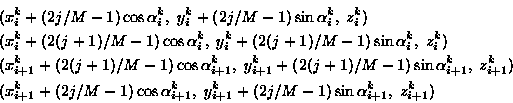
Finally we render the quads approximating the ribbon. We draw a total of (N-1)M quads, where N = 2k(n-1). The vertices of quad (i,j) are
 ,
and j is in the
range
,
and j is in the
range
 .
.
Your program should have four windows: two for defining the spine, one for defining the twist, and one for showing the results. A sample program with two windows will be provided. The two windows for specifying the curve are the orthogonal views of the XY and XZ plane. In each case, use a fixed field of view, extending, say, from -10 to 10 in each dimension. Draw only the spine curve in these windows, do not draw complete ribbons. In the third window, just show a circle, and a line segment indicating the angle.
Maintain the current control point for your operations. Each time a new point is added, it becomes current. Each time an old control point is selected by clicking on it, it becomes current. Initially, there are no control points, so there is no curent one.
Each time a control point is added or a position of control point
is changed, recompute the ribbon and update all windows,
using glutSetWindow and
glutPostRedisplay function
calls.
is displayed in the
twist window. To display a twist angle  ,
draw a unit circle, the coordinate axes and a unit line segment,
such that the angle between the segment and the X axis is
.
To change the angle, the user should click on
the twist angle window. Compute the direction from the
center of coordinates to the selected point and set the angle
to the anlgle between this direction and the X axis.
Do not forget to update the display. Note that this window
has to be updated each time a change is made in on of the
spiner curve windows.
,
draw a unit circle, the coordinate axes and a unit line segment,
such that the angle between the segment and the X axis is
.
To change the angle, the user should click on
the twist angle window. Compute the direction from the
center of coordinates to the selected point and set the angle
to the anlgle between this direction and the X axis.
Do not forget to update the display. Note that this window
has to be updated each time a change is made in on of the
spiner curve windows.