Computer graphics Programming Assignment 1
In this assignment you will implement several simple image processing operations: antialiased shift, magnification, minification and convolution. This assignment does not require use of OpenGL/GLUT: no user interface is required. However, additional credit will be given for a xv-style utility that can be implemented using GLUT and openGL's raster operations.
Write a program that will take an input image file in PPM format, apply one of the image processing operations and write out the result in PPM format.
Assume that the coordinate system has origin in the upper-left corner of the image, with y axis pointing down and x axis pointing to the right.
Your program should support the following command-line options:
If one of the arguments of an option is missing, your program should print an error message and exit.
At least one option has to be specified; any positive number of options can be specified; the order of operations should correspond to the order of options on the command line.
The last two command line argument should be the names of the input and output PPM files. If only one file is specified, the program should write to standard output. If no files are specified, the program should read standard input, and write to standard output.
PPM format is simple enough for you to write your own functions for input and output (see the description at the end of this assignment). On UNIX machines, to read and write images in PPM format you may also try using libppm library, if you have it on your computer (see man pages for details).
In all cases you will have to perform floating-point computations. Be careful when you convert the intensity values back to integers: the valid range is 0..255 and you should truncate your floating-point numbers if they happen to be outside of this range.
All operations should be applied to each color component separately.
Image processing applications are difficult to debug: always start with simple images, containing few pixels, for which you can manually compute or guess the result. For example, use constant images (all pixels have the same color), ``delta-function'' images (all pixels are black, and a single pixel in the center is white), ``Heaviside'' images (all pixels in the right half are white, all pixels in the left half are black). You can create small images of this type either manually (see PPM format description at the end).
Real and integer shifts should be performed by separate functions. Your program should check if the shift is integer and choose the function accordingly. The destination image should have the same size as the source image: parts of the image that get shifted outside the image should be discarded, empty space should be filled with zeros.
Resize allows to specify different factors in each direction.
If the original image was M pixels horizontally and N pixels vertically, the resulting image should be floor(M*x_scale) by floor(N*y_scale) pixels.
Magnification and minification are easier to implement separately. Depending on the values of x_scale and y_scale the function resize should call one or two of following functions: magnifyX, magnifyY, minifyX,minifyY.
Each function performs magnification/minification by a given factor in the corresponding direction. resize calls one or two of these functions depending on the values of the scale factors ( if a scale factor in x direction is less than 1, call minifyX if it is greater than 1, call magnifyX etc.)
Both operations are implemented using one function convolve, that takes an image and a matrix of filter coefficients as parameters.
The function convolve should compute the two-dimensional discrete convolution of the image with the filter.
The difference between smoothing and sharpening is only in the filter matrix.
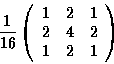
Smoothing is essentially lowpass filtering. If an image has high-frequency noise or undesirable high-frequency patterns, they can by smoothed out by a low-pass filter. Use the following 3 by 3 filter in your assignment:
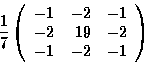
Sharpening is slightly trickier. A picture appears to be sharp if it has high-frequency structural components such as edges or small details. Of course, it is impossible to recover higher frequencies if they are absent in the picture. It is possible, however, to enhance these components if they are present but only with small amplitudes. The idea of sharpening is to high-pass filter the image without suppressing low frequencies completely. One of the possible filters for sharpening is
You should implement the algorithm described in the handout:
- convolve the image with two filters approximating the vertical and horizontal derivatives; do the convolution for the luminance (Y) values of the pixels, computed using the formula
Y = 0.299 R+0.587 G+0.114 B
- set each pixel to 255 if the magnitude of the gradient is above threshold and to 0 if it is below.
You can do all three operations (two convolutions and thresholding) in parallel to avoid intermediate storage.
The resulting image will be white near the edges and black otherwise.
If you wish, you may implement a simple user interface, which should be started only if no options are specified on the command line. Use OpenGL only to display the image as a raster.
Dragging the image with the mouse should result in continuous shifts; move the image by 1 pixel for each ten pixels of mouse displacement. Resizing the window should result in resizing of the image; other operation can be implemented using menus; for edge detection, use up and down arrows to adjust the threshold level.
As always, the source code and a working executable of your program
(see the Web page for the procedure to turn in your assignment).
In addition, we will provide
several test images on the class Web page and operations to perform on these
images. You should create the processed images with your program.
Put the processed images on a web page (do not convert to
gif of jpeg; simply link in the ppm images).
This description is from the SGI's IFL man page. The portable pixmap format is a lowest common denominator color image file format. The definition is as follows:
P3.
 height pixels, each three ASCII decimal values between 0 and
the specified maximum value, starting at the top-left corner of the
pixmap, proceeding in normal English reading order. The three values
for each pixel represent red, green, and blue, respectively; a value of
0 means that color is off, and the maximum value means that color is
maxed out.
height pixels, each three ASCII decimal values between 0 and
the specified maximum value, starting at the top-left corner of the
pixmap, proceeding in normal English reading order. The three values
for each pixel represent red, green, and blue, respectively; a value of
0 means that color is off, and the maximum value means that color is
maxed out.
#
to the next end-of-line are ignored (comments).
Here is an example of a small pixmap in this format:
     P3
     # feep.ppm
     4 4
     15
     0  0  0    0  0  0    0  0  0   15  0 15
     0  0  0    0 15  7    0  0  0    0  0  0
     0  0  0    0  0  0    0 15  7    0  0  0
     15  0 15    0  0  0    0  0  0    0  0  0
Programs that read this format should be as lenient as possible, accepting anything that looks remotely like a pixmap.